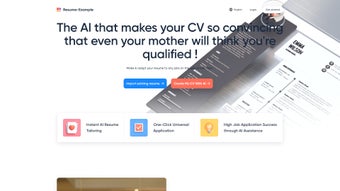

Download Resume-Example – Free Online Resume Builder & CV Creator
Overview
Resume-Example is a cloud‑based resume creation platform that turns the often‑daunting task of building a CV into a fast, intuitive experience. Designed for job seekers at every career stage, the tool offers a curated library of modern, industry‑specific templates that automatically adapt to the user’s input. Whether you’re a recent graduate targeting tech internships or a senior manager eyeing an executive role, the platform provides pre‑written content snippets and formatting cues that help you highlight achievements, quantify results, and maintain a professional tone.
The interface is built with simplicity in mind: drag‑and‑drop sections, inline editing, and real‑time preview make it possible for anyone—even those with limited technical skills—to craft a polished document in minutes. All data is stored securely in the cloud, allowing you to access and edit your resume from any device, anywhere. Because the service is web‑based, there’s no need to install bulky software; a modern browser is all that’s required.
In addition, Resume-Example offers export options to PDF, Word, and plain‑text formats, ensuring compatibility with applicant tracking systems (ATS) and employer portals. The combination of a user‑centric design, robust template selection, and helpful writing guides positions Resume-Example as a leading free tool for creating impactful resumes that stand out in today’s competitive job market.
Key Features & Template Library
- Extensive Template Collection: Over 120 professionally designed templates covering sectors such as technology, finance, healthcare, education, and creative industries. Each template is responsive, ensuring a clean layout on both desktop and mobile screens.
- Pre‑Written Content Samples: Ready‑made bullet points, summary statements, and skill sections that can be customized to reflect your personal experience, saving hours of writing and research.
- Live Preview & Real‑Time Editing: Changes appear instantly in a side‑by‑side preview, allowing you to see exactly how the final document will look while you edit.
- One‑Click Export: Download your finished resume as a high‑resolution PDF, Microsoft Word file, or plain‑text version for ATS compatibility.
- Cloud Sync & Multi‑Device Access: All resumes are saved to your personal dashboard, enabling secure access from Windows PCs, macOS laptops, Android tablets, or iOS smartphones.
- Customization Controls: Adjust fonts, colors, spacing, and section order with simple sliders and dropdown menus, ensuring each CV reflects your personal brand.
- Keyword Optimization Helper: Integrated suggestions that highlight industry‑specific keywords to improve ATS ranking and recruiter visibility.
- Free & Secure: The core resume builder is completely free, with optional premium add‑ons for advanced analytics. All user data is encrypted using SSL/TLS protocols.
Installation, Usage & Compatibility
Because Resume-Example operates entirely in the browser, there is no traditional installation process. To get started, simply visit the official website, create a free account using an email address or social login, and you’re ready to build. The onboarding wizard guides you through a quick questionnaire that identifies your industry, experience level, and preferred template style. Based on your answers, the system suggests the most suitable designs and pre‑filled content blocks.
Once you select a template, the drag‑and‑drop editor lets you add, reorder, or remove sections such as Work Experience, Education, Skills, and Projects. Inline editing provides a WYSIWYG experience: you type directly into the preview area, and formatting is applied automatically. If you need inspiration, click the “Examples” button to insert sample bullet points, then customize them with your own metrics.
Resume-Example is fully compatible with all major operating systems, including Windows 10/11, macOS Ventura and later, Linux distributions, as well as mobile platforms like Android 8+ and iOS 13+. The platform leverages HTML5 and CSS3 standards, guaranteeing smooth performance on Chrome, Firefox, Safari, and Edge. For users who prefer offline access, the tool offers a downloadable desktop shortcut that opens the web app in a dedicated window, mimicking a native application.
After finalizing your document, click the “Export” button to choose your desired file format. The PDF export includes embedded fonts to preserve layout integrity across devices, while the Word export maintains editable sections for future tweaks. For job boards that require plain‑text resumes, the tool strips all formatting and delivers a clean, ATS‑friendly version.
Security is a top priority: all personal data is stored on encrypted servers, and two‑factor authentication (2FA) is available for added protection. Regular automatic updates improve performance, add new templates, and keep the keyword database current with emerging industry trends—ensuring your resume stays fresh and competitive.
Pros, Cons, FAQ & Conclusion
Pros
- Completely free core functionality with no hidden fees.
- Huge selection of modern, industry‑specific templates.
- User‑friendly drag‑and‑drop editor suitable for beginners.
- Cloud‑based storage for easy access from any device.
- Keyword optimizer improves ATS visibility.
- Secure SSL encryption and optional 2FA.
Cons
- Advanced analytics and premium templates require a paid upgrade.
- Internet connection needed for full functionality.
- Limited offline editing capabilities compared to desktop software.
Frequently Asked Questions
Is Resume-Example really free?
Yes, the core resume builder, template library, and export options are completely free. Premium features like advanced analytics and exclusive template packs are optional.
Can I export my resume in a format that ATS systems accept?
Absolutely. Resume-Example offers PDF, Word (.docx), and plain‑text exports, all optimized for ATS parsing.
Do I need to install any software?
No installation is required. The tool runs entirely in your web browser, and you can access it on Windows, macOS, Linux, Android, or iOS.
Is my personal data safe?
All data is encrypted with SSL/TLS during transmission and stored on secure servers. Two‑factor authentication is available for added security.
Can I customize the design beyond the preset templates?
Yes. The editor lets you adjust fonts, colors, spacing, and section order, giving you full control over the visual style of your resume.
Conclusion & Call‑to‑Action
Resume-Example delivers exactly what modern job seekers need: a fast, secure, and completely free solution for building a standout CV without the steep learning curve of traditional design software. The extensive template pool, intelligent keyword helper, and seamless cloud sync make it a versatile choice for anyone aiming to land their next interview. While premium upgrades can enhance analytics, the free tier already provides everything required to craft a polished, ATS‑friendly resume. Ready to transform your job search? Download Resume-Example today, create a professional resume in minutes, and take the first step toward your next career opportunity.



.png)



